How To Configure Mozilla Firefox for Bengali

  • From Tools menu, select Options.
  • From this Options window, click on Contents.
  • Click on Advanced button in Fonts & Colors section.
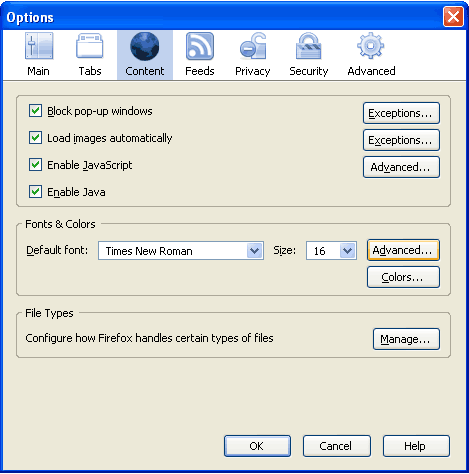
Firefox Options

  • Click on the drop down list for option Fonts For. Select Bengali from this list.
  • Complete all the option fields as in the following image (you may choose your any favourite Bangla font) and then click on OK.
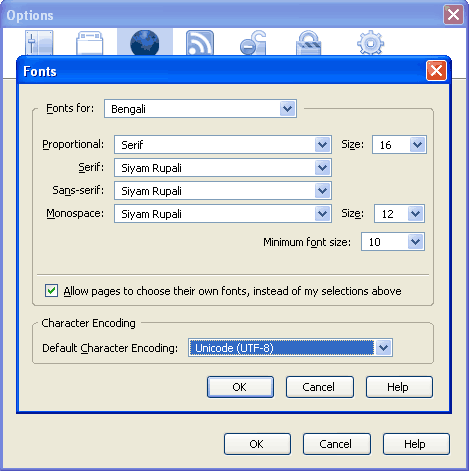
Firefox Fonts

Comments

15 responses to “How To Configure Mozilla Firefox for Bengali”

  1. Your highness,

  2. sourav

    dear sir,
    i am not able to read bengali language in mozilefirefox
    please help me out.
    i will wait for your reply
    thanks

  3. Hi Sourav, before I can help you I need to know what is your operating system? Is it Windows XP?

  4. Ananta

    it is good ….. very very thanks….. dear.

  5. Hi, Glad if you found this useful. Welcome!

  6. ron

    what is the best bangla font for mozilla beta?

  7. Hello, you can use Siyam Rupali font or Kalpurush fonts. Both can be downloaded from http://www.omicronlab.com/bangla-fonts.html

  8. Mahbubul Alam

    This solution is not working for FF4. Anybody help on this?

  9. Reza

    The given solution is not working. Please help.
    I updated to Firefox 4.0.1 now i am unable to use Bengali…

  10. Sashin

    Thanks man… It worked 🙂

  11. Helpful post. Thank you.

  12. Habib

    Hey, I dont know this site is still working or not!
    I am on Mac OSx and everything was fine until upgrading to firefox 7
    Now every time i try typing something in Bengali, the browser crashes. Do you have any suggestion for me?

  13. omar faruk

    very very thanks….. dear.

  14. […] Firefox users can check this niponwave article […]

Leave a Reply to Sashin Cancel reply

Your email address will not be published. Required fields are marked *