Download Day - English


How To Configure Mozilla Firefox for Bengali

  • From Tools menu, select Options.
  • From this Options window, click on Contents.
  • Click on Advanced button in Fonts & Colors section.
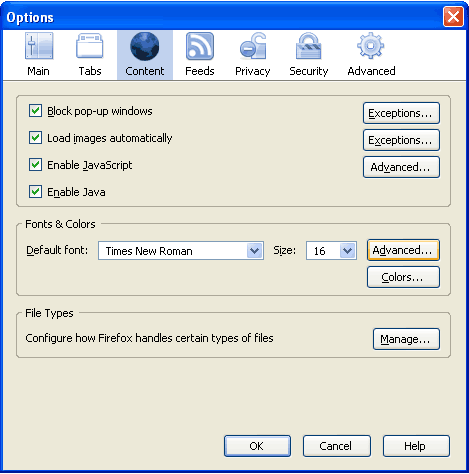
Firefox Options

  • Click on the drop down list for option Fonts For. Select Bengali from this list.
  • Complete all the option fields as in the following image (you may choose your any favourite Bangla font) and then click on OK.
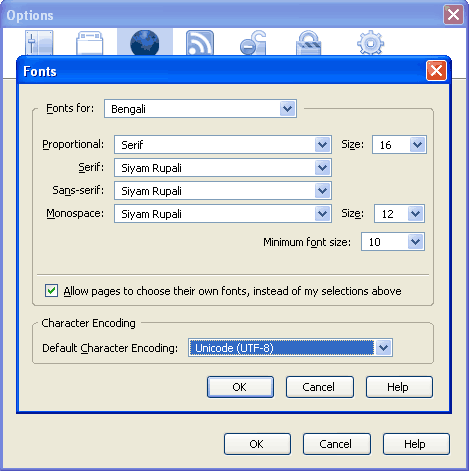
Firefox Fonts

Powered by Gregarious (41)
Share This

Related Entries

Firefox 3

3 Responses to “How To Configure Mozilla Firefox for Bengali”

  1. Gravatar Icon 1 gaurab

    Your highness,

  2. Gravatar Icon 2 sourav

    dear sir,
    i am not able to read bengali language in mozilefirefox
    please help me out.
    i will wait for your reply
    thanks

  3. Gravatar Icon 3 Nipon

    Hi Sourav, before I can help you I need to know what is your operating system? Is it Windows XP?

Leave a Reply


Close
E-mail It
Socialized through Gregarious 41