How To Configure Internet Explorer for Bengali
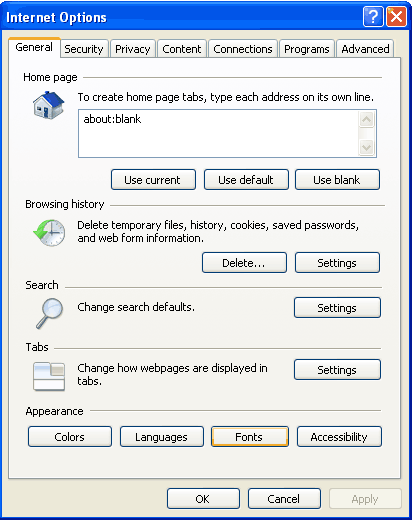
Published April 4th, 2007 in Technology and Tutorials. Tags: No Tags.- From Tools menu, select Internet Options.
- From Internet Options window, click on Fonts (on General Tab).
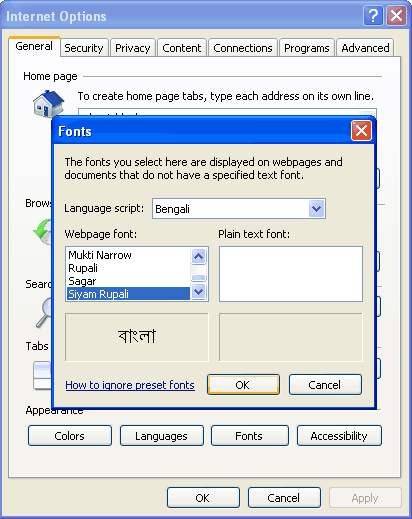
- Click on the drop down list for Language Script. Select Bengali from this drop down list.
- Select Siyam Rupali for Web Page Font (ofcourse, you can choose any other Bangla font). Then click OK.
Powered by Gregarious (41)
Share This
Related Entries
-
How To Configure Mozilla Firefox for BengaliBSNL GPRS on PrepaidFirefox: My Best BrowserSwitched To OperaBengali in MS Word - how to?How To: Bangla ChatHow to write in BengaliSiyam Rupali: Best Bangla FontBlogging in BanglaGoogle in your language

My IE is not showing SHYAM RUPALI in my bengali font list how can I add it.I have downloaded it in my documents.Plz suggest.
Hi, open the fonts folder and simply copy paste the font you have downloaded. You can open the fonts folder in the control panel. Now the font ll appear in ie. Hope this helps. Feel free to ask if you need any other help.
প্রীও বড বাই আমার ছালাম নিবেন।
বাই আমি চাই বাংলা থেকে আমি ইংলিশ করতে চাই জেমুন দ্রেন আমি এক টা বাংলা লীখ লাম তাআমী
ইংলীশ করব ঐ রক্ম এক টা ছিসটেম জানালে আমী আপনার কাছে ক্রতগ থাকভ……।
ধন্যবাদ
Bhalo kaaj korchis,oneker upokar hobe.keep it …………..